
If you want to know how to focus in open office environment, the short answer is this: reduce speech-based distraction, limit interruptions, and protect small blocks of deep work before your attention gets shredded. And just to be clear, this article is about open office workplaces, not Apache OpenOffice software, because how to focus in open office environment is really a people, noise, and layout problem.
You know the feeling, right? Someone starts a sales call three desks away, Slack pings, a coworker taps your shoulder “for one quick thing,” and suddenly 40 minutes disappear; research on work environment and employee well-being from the American Psychological Association helps explain why shared spaces can wear down attention so fast. That’s also why questions like “why can’t I focus in the office?” or “how to concentrate in open office” usually have more than one answer.
Here’s the practical framework you’ll get in this article: first, identify your main bottleneck — noise, interruptions, calls, layout, or cognitive overload — then match it to the right fix. We’ll cover what to do if you can your brain multitask your way through constant task switching — spoiler: not very well — and how to use realistic focus cycles based on ultradian rhythms for studying so your work blocks actually hold.
So here’s the deal. You’re not getting another generic list of “buy headphones and try harder.” You’ll get 12 specific strategies, boundary scripts, quiet-hours ideas, team-level fixes, and scenario-based advice for ADHD, introverts, and hybrid workers who need to know how to concentrate in open plan office setups without burning out.
The 12 strategies, at a glance:
1. Diagnose your biggest distraction first.
2. Block speech noise before general noise.
3. Use shorter, protected focus sprints.
4. Batch messages instead of checking constantly.
5. Create interruption rules with coworkers.
6. Use visible “do not disturb” signals.
7. Match tasks to the quietest times of day.
8. Move for calls, don’t take them at your desk.
9. Reduce visual clutter and foot-traffic exposure.
10. Use the right headphones for your work type.
11. Set team quiet hours in open office spaces.
12. Build a fallback plan for high-noise days.
I’m a software engineer, not a neuroscientist, but I’ve built FreeBrain tools around attention and learning and tested these methods in real work and study settings. Personally, I think this is the part most people get wrong: if you don’t diagnose the source of your open office distractions first, even good advice won’t stick.
📑 Table of Contents
- How to focus in open office environment
- Why open offices drain attention
- Run a 5-minute distraction audit
- 12 smart fixes for real workdays
- Frequently Asked Questions
- Why can't I focus in the office even when I'm trying hard?
- How do you stay productive in an open plan office?
- How can I reduce interruptions in an open office?
- How do you deal with noise in an open office?
- How to focus in open office with ADHD?
- How do you set boundaries with coworkers in an open office?
- Conclusion
How to focus in open office environment
So here’s the practical answer: how to focus in open office environment usually comes down to three moves—reduce speech-based distraction, limit interruptions, and protect short blocks of deep work. This article is about open office workplaces, not Apache OpenOffice software. For more on productivity and focus, see our productivity and focus guide.

I’m writing this as a software engineer who built FreeBrain tools around attention and learning, but not from gut feeling alone. Research on speech distraction, task switching, and cognitive load gives us a much better map—and if office overload spills into mental fatigue, it also helps to learn how to study complex topics without overload.
Open offices are hard on attention because your brain processes nearby language automatically, even when you’re trying not to listen, and interruptions leave “attention residue” when you switch back. If you’ve ever wondered can your brain multitask, the short answer is: not well under constant interruption.
A quick definition and short answer
In this context, focus means sustained attention on mentally demanding work despite nearby speech, movement, pings, and social drop-ins. And how to concentrate in open office settings is different from generic productivity advice because the triggers are specific: noise, visibility, calls, layout, and unplanned interaction.
📋 Quick Reference
Best results come from matching the fix to the trigger. No single tactic works for every role, team, office, or neurotype.
The 12 strategies at a glance
- Run a distraction audit
- Use speech-blocking audio
- Try passive earplugs
- Relocate for calls
- Create visible focus signals
- Use boundary scripts
- Schedule 30–60 minute focus blocks
- Batch chat and email
- Reduce visual clutter
- Improve line of sight
- Set quiet hours
- Create team call norms
You’ll get better results by matching the fix to the trigger instead of trying everything at once. For example, focus blocks work better when they fit natural energy cycles, which is why I often point readers to our breakdown of ultradian rhythms for studying.
Evidence reviewed in research on auditory distraction in the National Library of Medicine supports the idea that intelligible speech is especially disruptive. And broader findings on workplace stress from the American Psychological Association’s work stress resources help explain why open office distractions can feel draining fast.
Next, we’ll look at why open offices drain attention so reliably—and which distraction types do the most damage.
Why open offices drain attention
So here’s the deal: if you’re trying to figure out how to focus in open office environment, the problem usually isn’t weak willpower. It’s that your brain is being asked to filter meaning, motion, and interruptions all at once.

Speech, movement, and sensory overload
Research in cognitive psychology suggests intelligible speech is more disruptive than steady background noise because your brain keeps decoding words, even when you’re trying not to listen. A fan hum fades. Nearby dialogue doesn’t. And if you’re already mentally loaded, it gets worse—especially when you’re doing work that requires you to study complex topics without overload.
If your desk faces a walkway, peripheral movement adds another layer of open office distractions. For some people—especially those with sensory sensitivity or more introvert-friendly work preferences—that mix of speech, motion, and alerts becomes real sensory overload.
The hidden cost of interruptions
As we explain in can your brain multitask, task switching has a hidden tax. A 20-second interruption can trigger minutes of recovery because part of your mind stays on the last task; psychologists call this attention residue, a concept summarized on Wikipedia’s overview of attention residue.
Picture it. In a quiet room, you write a report for 20 straight minutes. In an open office, 4 Slack pings, 2 shoulder taps, and a nearby conversation keep breaking the thread. That’s why you can’t concentrate in open office settings even before the next interruption lands.
Noisy offices can also raise stress and mental fatigue, which makes focus feel worse fast; the American Psychological Association’s stress resources explain how stress can impair attention and thinking. And if your workplace rewards instant replies, individual discipline alone won’t fix it.
Common mistakes to avoid
- Blaming yourself when the setup, norms, or team expectations are the real issue.
- Planning huge deep-work blocks instead of shorter protected cycles aligned with ultradian rhythms for studying.
- Stacking music, notifications, and chat on top of office distraction.
- Buying expensive headphones before identifying whether speech, interruptions, or visual traffic is the main trigger.
Which brings us to the practical move: before changing tools, figure out exactly what’s stealing your attention. That’s what the next 5-minute distraction audit will help you do.
Run a 5-minute distraction audit
Now that you know why open offices drain attention, don’t guess. If you’re figuring out how to focus in open office environment situations, a 5-minute audit will usually beat trying random hacks.

How to run a fast distraction audit
- Step 1: Track your biggest trigger for one normal workday or one 60-minute block.
- Step 2: Rate each trigger from 1-5 for frequency and 1-5 for disruption.
- Step 3: Multiply the scores and fix the top one or two first.
Step 1: Spot your main trigger
Use five buckets: speech/noise, coworker interruptions, phone calls, visual layout, and cognitive overload. Ask: what breaks your focus most often, and what takes longest to recover from? That’s usually the real bottleneck, especially since can your brain multitask is mostly the wrong question in open office distractions.
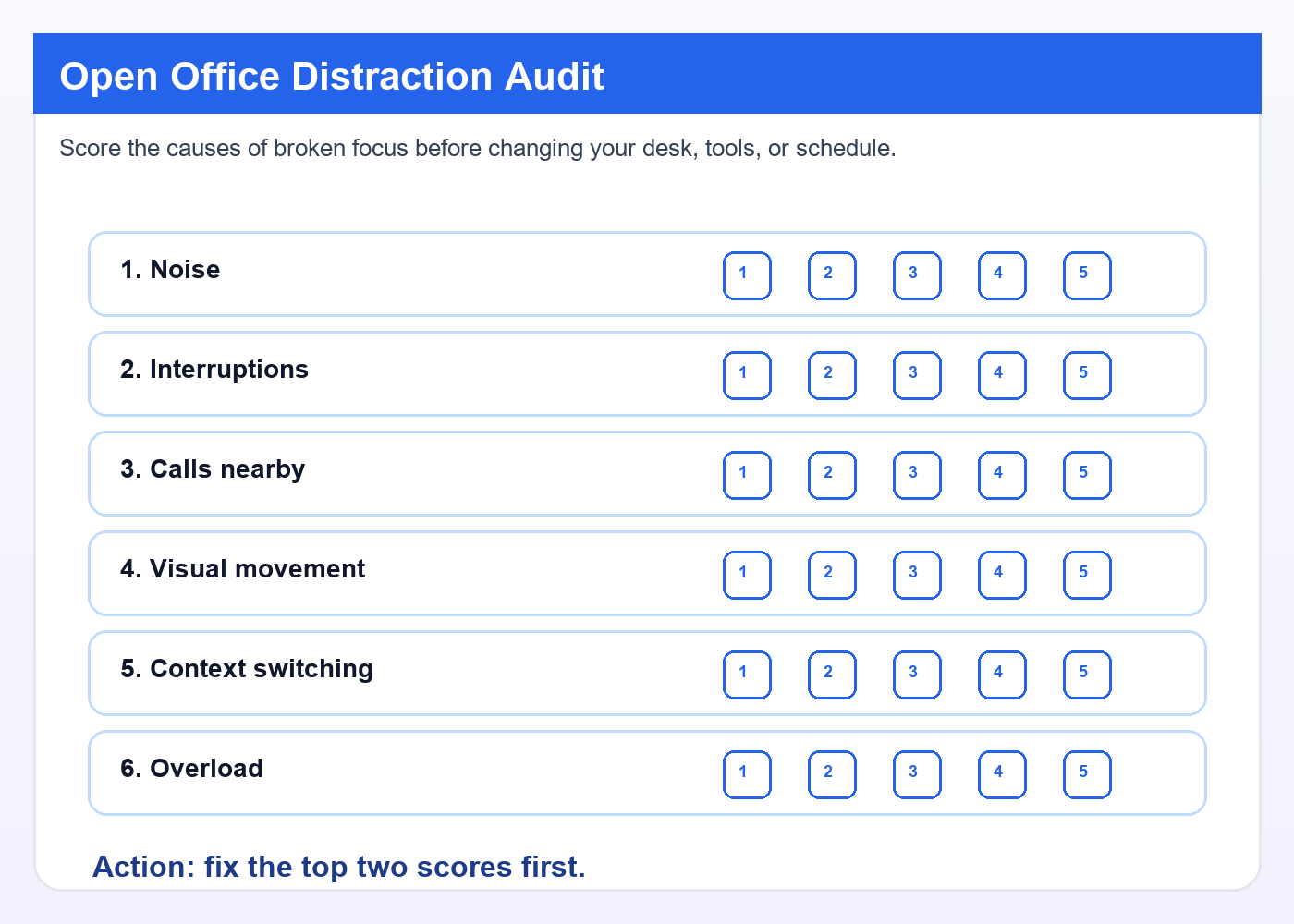
Step 2: Score frequency and impact
Rate each trigger 1-5 for frequency and 1-5 for disruption, then multiply. Example: nearby sales calls 4×5=20, Slack pings 5×3=15, visual foot traffic 3×4=12. Start with the highest score only, or the top two if they’re close. That’s how to reduce interruptions at work without overreacting to minor workplace distractions.
Step 3: Match the fix to the problem
- Noise: headphones, earplugs, white noise, or relocation for deep work.
- Interruptions: visible status signals, no-chat blocks, scripts, question batching.
- Calls: call zones, phone windows, or moving for meetings.
- Layout: change line of sight, add a visual shield, cut clutter and alerts.
- Overload: shorter focus blocks, batch shallow work, fewer tabs and channels; this also helps if you need to study complex topics without overload.
From experience: what usually works first
After building FreeBrain tools and looking at how people struggle with attention, the biggest gains usually come from removing the top one or two friction points, not trying 10 habits at once. Personally, I think this is the part most people get wrong. Facing away from foot traffic, setting two daily no-chat blocks, or using one polite boundary script often works better than “try harder” advice. And if your team is call-heavy by design, norms matter more than personal hacks. Next, we’ll turn your top scores into 12 smart fixes for real workdays.
12 smart fixes for real workdays
Your audit should now show the real problem: speech, pings, walk-ups, or bad timing. That matters, because how to focus in open office environment depends less on willpower and more on matching the fix to the distraction.
Noise and interruption fixes
Speech is usually the biggest attention killer. Research on office noise suggests intelligible conversation disrupts working memory more than steady background sound, so the best headphones for open office are the ones you can wear comfortably for hours and that reduce speech clarity, not just volume.
- Use noise-cancelling headphones for speech-heavy zones.
- Use passive earplugs for short writing bursts.
- Try white or pink noise if steady masking helps.
- Relocate for calls or dense writing work.
No single setup works for everyone. To reduce interruptions at work, pair audio with scripts: “I’m in a focus block until 11 — can I come by after that?” “Can you drop that in chat so I can batch it at 2?” “I want to give this proper attention; can we do 10 minutes after lunch?”
Desk, schedule, and call setup
If you’re wondering how to stay productive in open office setups, skip fantasy 3-hour deep-work plans. Use 30-60 minute protected blocks, then a short message window, which fits better with realistic energy cycles like ultradian rhythms for studying.
Face away from walkways if you can. Keep only active materials visible, mute nonessential notifications, and batch email, chat, and admin. And yes, move phone calls in office areas to call zones when possible.
Team norms that actually help
Some disadvantages of open plan office design aren’t personal failures. Open office vs cubicle vs closed office? Openness can help quick collaboration, but barriers usually help privacy and sustained focus.
Try this quiet-hours template: “10:00-12:00 and 2:00-3:00 are no-tap, no-call-at-desk hours except urgent issues. Non-urgent questions go to chat or shared docs.” If focus problems are team-wide, managers should redesign norms, not blame workers.
If you’re dealing with ADHD, anxiety, sensory overload, or severe concentration problems, these tactics may help, but consult a qualified healthcare professional or workplace accommodations specialist for diagnosis, treatment, or support. And if exhaustion is part of the picture, FreeBrain also has resources on brain fog, burnout, meditation resets, and productivity systems. Next, let’s wrap this up with the most common questions and the simplest next steps.
Frequently Asked Questions
Why can’t I focus in the office even when I’m trying hard?
If you’re wondering why can’t i focus in the office, the problem usually isn’t laziness. Nearby conversations, people walking past, and constant small interruptions all compete for your attention, so your brain keeps reorienting instead of staying locked on one task. And when you switch tasks, some of your attention sticks to the last thing for a while — that’s why it can take several minutes to fully get back on track. Stress, poor sleep, and burnout can make this feel much worse, which is also why learning how to focus in open office environment often starts with fixing the setup around you, not just trying harder.
How do you stay productive in an open plan office?
If you’re asking how do you stay productive in an open plan office, start smaller than most people think. Use short protected focus blocks of 25 to 45 minutes, batch shallow work like email and admin into separate windows, and remove the biggest visible and digital distractions before you begin. Personally, I think the best approach is to pick one noise fix and one interruption fix first — not ten — then schedule your hardest work during the quietest part of your day, whether that’s early morning, right after lunch, or whenever your office settles down.
How can I reduce interruptions in an open office?
The best answer to how can i reduce interruptions in an open office is to make your focus visible and your availability predictable. Try a simple combo: calendar focus blocks, a visible cue like headphones or a desk sign, and a polite script such as, “I’m in the middle of something — can I come back to you at 2?” Batch chat and email replies at set times so you’re not context-switching all day, and if the whole team is getting interrupted nonstop, push for shared norms like quiet hours or message-first communication. For a practical system, you can also point readers to FreeBrain’s focus resources at FreeBrain.
How do you deal with noise in an open office?
If you want to know how do you deal with noise in an open office, reduce intelligible speech first. Human speech is usually more distracting than steady background hum because your brain automatically tries to decode words, so tools like noise-canceling headphones, soft earplugs, white noise, or moving farther from talk-heavy zones tend to help more than just “getting used to it.” But wait — comfort matters too. Test one option at a time for a full week and track which setup actually helps you focus in an open office, not just which one sounds good in theory; the CDC’s workplace noise guidance is also a useful reference.
How to focus in open office with ADHD?
When people ask how to focus in open office with adhd, the answer is usually more external structure, not more willpower. Shorter focus blocks, fewer open tabs and chat channels, visible cues that signal “do not interrupt,” and predictable daily routines can lower the mental load, especially if speech and movement feel unusually intrusive. Sensory sensitivity can make open offices much harder to manage, so if you’re trying to figure out how to focus in open office environment with ADHD-related challenges, treat this as educational guidance and consult a qualified healthcare professional or workplace accommodations specialist for diagnosis, treatment, or formal support.
How do you set boundaries with coworkers in an open office?
If you’re figuring out how to set boundaries with coworkers in open office, keep your scripts short, calm, and specific. For immediate interruptions, try “Can I finish this and come by in 20 minutes?”; for non-urgent requests, “Send it to me and I’ll review it at 3”; for recurring drop-ins, “Mornings are my focus time, but I’m free after lunch.” Which brings us to the part most people miss: boundaries work better when they’re backed by team norms, shared response-time expectations, and clear quiet periods — not just individual effort.
Conclusion
If you want a practical answer to how to focus in open office environment, keep it simple: run a 5-minute distraction audit, identify your top two attention killers, and fix those first. For most people, that means reducing noise with headphones or sound masking, protecting one or two deep-work blocks on the calendar, and making interruptions less likely with visible signals like status lights, desk cues, or a quick “I’m heads-down until 11” message. And yes, small layout tweaks matter too. Moving your screen, changing your seat, or batching chat checks can cut more mental friction than people expect.
Open offices are hard on attention. That’s not a personal failure. Well, actually… it’s often the environment, not your willpower, that’s doing the damage. The good news is that you don’t need a perfect office to do solid work. You just need a better system. Start with one change today, test it for a week, and keep what works. That’s how real improvement happens — not through heroic concentration, but through smart design.
If you want more help building that system, explore more guides on FreeBrain.net. You might like how to stop procrastinating when you’re overwhelmed and deep work study method for practical ways to protect attention and get more done. Speaking of which — the best time to improve your focus isn’t next Monday. It’s your next 10 minutes. Pick one fix, set it up, and make your workspace work for you.