Personal energy management beats time management when the work is cognitive, not mechanical. Time is fixed; your mental energy isn’t—and your output rises or collapses based on that. This article breaks down personal energy management fast, then shows you how to match your hardest work to your best hours using our Focus & Productivity Tools.
You’ve probably tried “better planning” already. But you still hit that 2:30 p.m. wall, reread the same paragraph five times, or leave back-to-back meetings too fried to do real work. And here’s the kicker — research on attention residue and task switching helps explain why: when you bounce between tasks, part of your attention stays stuck on the last thing, so the next thing feels harder than it should.
So here’s the deal. You’ll get a simple “Time vs Energy” decision matrix (task type × cognitive load × chronotype × meeting load) that tells you when to use energy management vs time management—without the fluff. Then we’ll run a combined time-and-energy audit template (yes, a real time and energy audit you can finish in 15 minutes) and a 7-day plan tailored for students, remote/hybrid workers, and heavy-meeting roles.
We’ll also cover recovery, because personal energy management isn’t just “work harder in the morning.” Sleep pressure, circadian timing, and stress load matter—so you’ll see exactly how to maintain energy at work and what to do when you’re sliding toward burnout. If you want a practical reset, pair the plan with our Stress & Sleep Tools.
Quick credibility note: I’m a software engineer who builds FreeBrain’s study and focus tools, and I’ve watched thousands of real sessions reveal the same pattern—personal energy management is the missing layer that makes time plans actually stick.
📑 Table of Contents
- Intro: Personal energy management beats “more hours” for knowledge work
- Energy management vs time management: definitions + quick reference
- The science of personal energy management: circadian, ultradian, switching costs
- When to use personal energy management vs time management (decision matrix)
- How to do a time and energy audit (30 minutes + 7 days) — step-by-step
- 7 personal energy management techniques (plus mistakes to avoid + real-world use)
- Conclusion: Run a 7-day personal energy management experiment (and keep it simple)
- Frequently Asked Questions
- Conclusion
Intro: Personal energy management beats “more hours” for knowledge work
If the last section made you think “I just need more hours,” you’re not alone. But time is fixed; personal energy management is variable—and your output tracks cognitive energy more than calendar time. For more on productivity and focus, see our productivity and focus guide.
Two hours writing at 9am can produce a clean draft; the same two hours at 3pm might turn into rereading, Slack replies, and a half-page. That’s why I’d rather you build a personal energy management system than squeeze your day tighter—start applying it with FreeBrain’s Focus & Productivity Tools (trackers and templates make the pattern obvious fast).
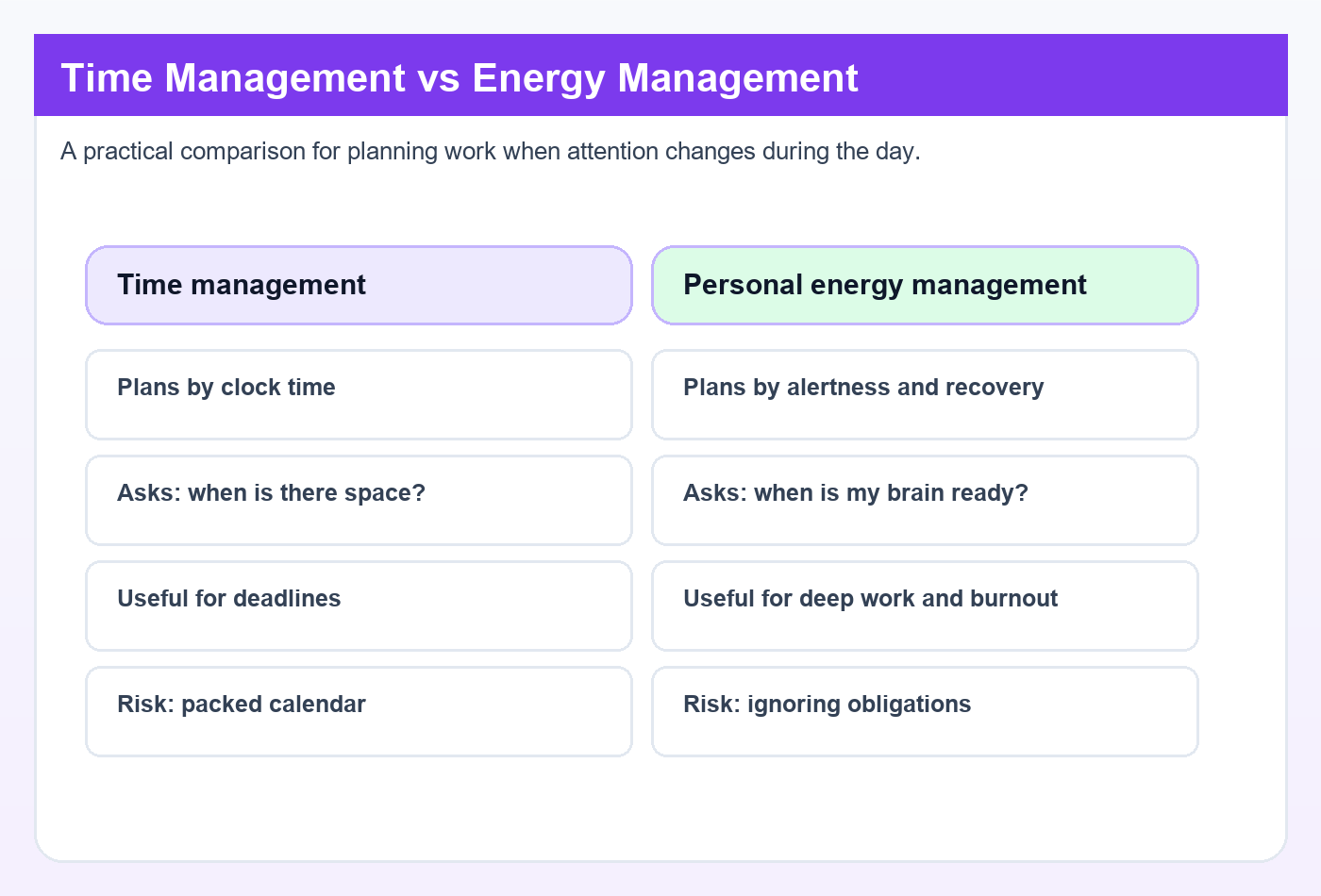
Quick definitions. Time management is allocating hours. Personal energy management is matching tasks to your energy patterns and protecting recovery so your brain can actually do the work.
And yes, there’s science behind the swings: circadian timing and fatigue cycles change alertness and performance across the day, not just “motivation.” A practical overview is on Wikipedia’s circadian rhythm summary, which links out to the core physiology research.
Recovery is part of the job. If you want help tracking sleep pressure, stress load, and wind-down routines, use the Stress & Sleep Tools alongside your work plan.
What you’ll get in 10 minutes
So here’s the deal: this section sets up a simple personal energy management process you can test immediately. You’re going to run a small experiment, not rebuild your whole life.
- A Time vs Energy decision matrix (when to use energy management vs time management)
- A 30-minute time-and-energy audit template, then a 7-day tracking plan
- Seven proven techniques tuned for students, remote/hybrid work, and meeting-heavy roles
Who’s this for? Students cramming, knowledge workers shipping projects, and managers stuck in back-to-back meetings. If your work is mostly thinking, personal energy management is the highest-leverage skill you can practice.
The “busy but drained” problem (and why it’s common)
Your calendar tracks time, not cognitive load. Which means you can “do everything” and still feel wrecked—because meetings, decision-making, and context switching burn through an energy budget you never planned for.
OK wait, let me back up. When you bounce between email, a doc, a standup, then a hard problem, you pay switching costs and attention residue; the hours look full, but your brain’s fuel is gone. That’s why “burnout and time management” often shows up together: you’re managing minutes while ignoring energy.
The common fix is boring—and it works: protect peak hours for deep work, batch shallow tasks, and schedule real recovery blocks. That’s personal energy management in practice, and next we’ll define energy management vs time management clearly and drop a quick reference you can use all week.
Energy management vs time management: definitions + quick reference
If the last section made one point, it’s this: more hours isn’t the same as more output. The missing piece is personal energy management—and you can start applying it today with Focus & Productivity Tools.
And yes, recovery counts. Sleep pressure, stress, and downtime decide how much “good brain” you can access, so keep Stress & Sleep Tools in your toolkit when you plan your week.
The 1-sentence difference (snippet-ready)
Time management schedules hours; personal energy management schedules your best brain states. That’s the simplest way to think about energy management vs time management without getting lost in jargon.
Concrete example: writing code or doing problem sets needs working memory and sustained attention, so you schedule it when you’re sharp. Email triage or form-filling is lower-load work, so you schedule it when you’re mentally “meh” but still functional.
Here’s the “when you work” line: if your cognitive energy is highest at 9–11am, that’s your deep work window—even if your calendar says you’re “free” at 4pm.
Which brings us to the actual energy management process. It’s not mystical. It’s four stages:
- Notice patterns → track when you feel focused vs foggy.
- Protect peaks → reserve high-energy blocks for high-load tasks.
- Reduce drains → cut the stuff that quietly burns attention.
- Recover on purpose → recharge instead of “scroll-resting.”
Student + worker examples for each stage:
- Notice patterns: A student logs that recall practice feels easiest before lunch; a remote worker notices Slack pings spike after 2pm and attention drops right after.
- Protect peaks: The student schedules two 45-minute problem-set sprints at 10am; the worker blocks 90 minutes for architecture/design before meetings start.
- Reduce drains: The student studies with phone in another room; the worker turns off non-urgent notifications and batches email twice daily to avoid constant switching.
- Recover on purpose: The student takes a 10-minute walk between study blocks; the worker uses a real break (water, light movement, breathing) instead of “just one more tab.”
Why ‘when you work’ often beats ‘how long’
Same 60 minutes, different output. That’s cognitive throughput: fatigue, sleep debt, and stress can cut your ability to hold and manipulate information, even if you’re “working” the whole time.
Personally, I think this is the part most people get wrong: they measure effort in minutes, not in usable attention. And research on task switching backs the pain—switching leaves “attention residue” that reduces performance on the next task, especially when the first task was unfinished (see the concept of attention residue).
Try a simple schedule that matches energy vs time management to reality:
- Peak (e.g., 9–11am): deep work, studying, writing, hard problem solving.
- Post-lunch dip (e.g., 1–3pm): admin, easy reviews, inbox cleanup, routine tasks.
- Second wind (varies): collaboration, editing, light creation, planning.
OK wait, let me back up: this doesn’t mean you can only do hard work in the morning. It means personal energy management helps you spend your best cognitive fuel on the tasks that actually need it.
📋 Quick Reference: choose the right lever fast
📋 Quick Reference
If task requires deep focus, schedule it in your peak window; use: single-tasking + notifications off + one clear goal.
If task requires learning/studying, schedule it when alertness is high; use: active recall + short timed sets + quick error review.
If task is admin/low-stakes, schedule it in low-energy hours; use: checklists + batching + “two-pass” skim then respond.
If task is meetings/collaboration, schedule it in protected windows (e.g., 1–4pm); use: agenda + time-boxing + no-meeting mornings when possible.
Mini decision rules you can use in 10 seconds:
- Low energy? Reduce cognitive load: smaller steps, templates, batching, fewer decisions.
- High energy? Do creation and learning: design, coding, writing, hard studying.
- Meeting load rising? Cluster meetings into 1–2 windows/day to protect focus blocks from fragmentation.
“Isn’t this just time blocking?” Not really. Time blocking is a tool for placing work on a calendar; personal energy management is the strategy that decides what belongs in those blocks, based on your brain’s predictable ups and downs.
So when should you use which? Use time management for deadlines, logistics, and coordination; use personal energy management for high-cognitive tasks, heavy meeting weeks, and any role where context switching is the hidden tax. And if you’re worried about burnout, treat recovery as a first-class block—NIH notes that sleep supports learning, memory, and mood regulation (see research from the National Institute of Neurological Disorders and Stroke on sleep).
Next up, we’ll get specific about the science behind these swings—circadian timing, ultradian cycles, and why switching costs can quietly wreck your day even with “perfect” planning.
The science of personal energy management: circadian, ultradian, switching costs
In the last section, we separated energy management from time management. Now we’ll pin personal energy management to the biology and cognitive mechanics that make your “best hours” predictable instead of mysterious. You can start applying this immediately with our Focus & Productivity Tools.
Quick note: this is educational, not medical advice. If you have persistent fatigue, sleep problems, or you’re on medications that affect sleep/alertness, talk to a qualified clinician—because your baseline changes the whole personal energy management picture.
Circadian rhythm, chronotype, and light exposure
Your circadian rhythm is a roughly 24-hour timing system that shifts alertness, body temperature, hormones, and sleepiness across the day. And chronotype is your personal “timing preference” within that system—earlier vs later peaks—without it being destiny or a moral trait.
Two forces drive daily energy. First is circadian alerting (your internal clock pushing wakefulness at certain times). Second is sleep pressure (the longer you’re awake, the more your brain builds a need for sleep). For a solid personal energy management baseline, you want those forces aligned, not fighting.
Light is the strongest cue your clock listens to. Morning light tends to shift the clock earlier and supports daytime alertness, while bright light late at night can delay sleepiness. For an authoritative overview, see research from the National Institutes of Health on circadian rhythms.
Practically, two habits do a lot of work: a consistent wake time (even on weekends) and getting outdoor light early in the day when possible. Well, actually… you don’t need perfection; you need “usually.” If sleep pressure is a mess, use our Stress & Sleep Tools to track sleep timing and recovery signals without guessing.
- Expect a post-lunch dip: many people feel a slump early afternoon due to circadian timing plus meal effects, even after a “good” lunch.
- Match task to clock: do high-stakes thinking near your daily alertness peak; save admin for the dip.
- Don’t over-label yourself: “night owl” isn’t a free pass; it’s a starting hypothesis to test.
Ultradian cycles: focus sprints + recovery breaks
Circadian rhythm sets the day’s big wave. Ultradian rhythms are the smaller cycles inside it—often around 90–120 minutes—where focus rises, plateaus, then drops. Ignore the drop and you’ll call it “lack of discipline,” but it’s often just biology.
So here’s the deal for personal energy management: plan work in 2–4 ultradian cycles per day for deep work or studying, and protect the recovery breaks like they’re part of the assignment. A typical pattern is 70–100 minutes of focused work, then 5–15 minutes of active rest (walk, stretch, water, slow breathing). Scrolling is usually not rest; it’s just more input.
Student example. Two cycles can cover a problem set: Cycle 1 for attempting questions and noting gaps; Cycle 2 for rework plus error logs. Another simple combo is one cycle for reading and one for recall (close the book, write what you remember, then check).
If 90 minutes feels too long, a Pomodoro-style structure can be a “training wheels” version: shorter focus blocks with more frequent breaks. The key is still the same: your personal energy management improves when breaks are scheduled before you’re depleted, not after you’ve crashed.
Decision fatigue, attention residue, and context switching
Ever feel tired but unproductive? That’s often switching costs, not low ability. When you jump between tasks, your brain carries “attention residue”—a portion of your mind stays stuck on the previous task, lowering performance on the next one (Leroy, 2009).
Multitasking is the usual culprit. And yes, Slack/email pings are basically residue generators in remote and hybrid work. The practical personal energy management move is to batch communication into windows and keep one “primary task” per block.
Decision fatigue is trickier. Some findings are debated, and effects vary by context, so I treat it as a risk factor, not a universal law. But the workaround is still gold: reduce micro-decisions with defaults and checklists.
- Default start: same first task each day (e.g., 10 minutes planning, then your hardest work).
- Single capture list: one place for incoming tasks so you’re not re-deciding what matters every hour.
- Notification rules: two check-in times for email/DMs, not constant grazing.
Timeline image suggestion: a simple chart showing (1) a circadian alertness curve across the day, (2) a marked post-lunch dip window, and (3) 90–120 minute ultradian cycles with break points layered on top.
Trust/limitations: individual differences are huge. Sleep debt, health conditions, stress, and medications can shift your energy curve; self-tracking beats guessing, and HRV can be a useful optional indicator but it’s not diagnostic. Which brings us to the next section: when you should rely on personal energy management versus classic time management, using a simple decision matrix.
When to use personal energy management vs time management (decision matrix)
The last section explained why your energy rises and falls (circadian + ultradian rhythms) and why switching tasks drains you faster than you expect. Now you’ll use that science to decide when personal energy management matters more than classic scheduling — and when plain time management is enough — using a simple decision matrix you can apply today Focus & Productivity Tools.
One more thing before we get tactical: if your sleep is off, your “peak” window gets blurry, and your decision matrix breaks. That’s why I pair personal energy management with recovery basics and quick checks from Stress & Sleep Tools.
📋 Quick Reference
Use personal energy management when: task is high-cognitive-load (writing, coding, problem sets), stakes are high, or you’re switching contexts a lot.
Use time management when: task is low-load, repeatable, or externally scheduled (admin, routine reviews, many meetings).
Meeting load rule: >3 hours/day meetings → protect at least 1 maker block (60–90 min). <1 hour/day meetings → protect 2–3 maker blocks (60–90 min each).
Task types: deep work, admin, meetings, learning/studying
Think of your week as four task types, each with a different energy “price tag.” Deep work is creation: writing, coding, design, data analysis. Admin is maintenance: email, scheduling, expense reports, file cleanup.
Meetings are coordination: 1:1s, standups, reviews, interviews, client calls. Learning/studying is skill building: lectures, reading, problem sets, retrieval practice, flashcards. And yes, learning can feel like deep work when it’s active recall.
Here’s the rule I use (and it’s the part most people get wrong): match the task to the brain state, not the clock. Research on cognitive fatigue and attention control suggests high-demand tasks degrade faster as mental resources drop, while simpler tasks stay stable longer (see reviews on mental fatigue in PubMed).
- If it creates value (new output or real learning), schedule it in your peak window and protect it from interruptions.
- If it maintains value (keeps systems running), batch it into dips or low-energy slots.
- If it coordinates people, cluster it into meeting windows to reduce context switching.
Which means personal energy management is your first lever for deep work and studying, while time management is your first lever for admin and meeting logistics. But wait — what about a “high-stakes meeting”? If it needs sharp thinking (negotiation, performance review), treat it like deep work and put it near your peak.
A simple table: best time-of-day + best tactic
Below is the decision table I’d put on a wall. “Peak/mid/dip” is personal (chronotype varies), and the next section’s audit will help you find yours; research on chronotype differences shows meaningful variation in performance timing across people (overview: NCBI).
Image placement: decision matrix/table graphic goes here.
| Task | Type | Cognitive load | Best time | Recommended tactic |
|---|---|---|---|---|
| Writing a report/spec | Deep work | High | Peak | 90-min deep work block; phone away; single tab |
| Coding/debugging | Deep work | High | Peak | 60–90 min maker block; clear “next failing test” goal |
| Problem sets (STEM) | Learning | High | Peak | Active recall + timed sets; short break every 25–45 min |
| Reading/lecture notes | Learning | Med | Mid | Time blocking + retrieval prompts in margins |
| Inbox triage | Admin | Low | Dip | Task batching; 2–3 fixed check-ins/day |
| Weekly planning | Admin | Med | Mid | Time blocking using time blocking templates |
| 1:1s / status updates | Meetings | Med | Mid | Meeting window + agenda; end with next actions |
| Brainstorming | Deep work | Med | Peak or Mid | Short sprint + capture; then convert to tasks later |
| End-of-day review | Admin | Low | Dip | 10-min review; prep first task for tomorrow |
Notice the pattern? Energy management vs time management isn’t a personality debate; it’s workload math. When cognitive load is high, personal energy management decides whether you get quality output or just “hours logged.”
If you want a clean deep-work playbook to pair with your peak windows, use Cal Newport deep work steps as the structure, then place it where your energy is naturally highest.
Role-based guidance (students, knowledge workers, managers)
Students: Put retrieval practice (practice tests, flashcards, writing from memory) in your peak window. Do reading in mid-energy, and shove admin (email, LMS clicks, formatting) into dips. Energy choppy today? Use short focus cycles so personal energy management doesn’t depend on willpower.
Knowledge workers: Protect 2 creation blocks per day when possible (2×60–90 minutes), then batch communication 2–3 times daily. Remote/hybrid makes this harder because Slack creates “micro-switching,” so be strict about notification windows. Personally, I think this is where time blocking fails unless you also respect energy.
Managers: Cluster meetings into windows and keep at least one maker block. If meeting load is >3 hours/day, guard one 60–90 minute block like it’s a deadline; if it’s <1 hour/day, aim for 2–3 blocks. Use agendas and async pre-reads to lower cognitive load, which is a sneaky form of personal energy management that reduces burnout risk.
Next up, you’ll run a fast 30-minute baseline plus a 7-day audit to identify your true peak/mid/dip windows — so this matrix becomes your actual schedule, not a nice idea.
How to do a time and energy audit (30 minutes + 7 days) — step-by-step
You’ve already seen when time management wins and when energy-first planning wins. Now you’ll run a simple time and energy audit so your personal energy management plan is based on your real week, not vibes.
This takes 30 minutes to set up and 7 days to track, and you can run it alongside your normal workflow using FreeBrain’s Focus & Productivity Tools.
How to do a 7-day time and energy audit
- Step 1: Pick your tracking format (2 minutes). Use a notes app, a paper grid, or a time and energy management template (Google Sheet). If you like printing, export a time and energy management pdf so it’s always visible.
- Step 2: Set 6 daily check-ins (3 minutes). Minimum viable tracking is 6 check-ins/day, ideally at the start of each work block (takes ~60 seconds each): morning start, mid-morning, pre-lunch, post-lunch, mid-afternoon, end-of-day.
- Step 3: Log what you’re doing (7 days). Each check-in captures time + task + context + ratings. Don’t chase perfection; consistency beats detail for personal energy management.
- Step 4: Tag cognitive load (10 seconds each). Add H/M/L load so you can separate “low energy” from “high load.” This is where most time audits fail.
- Step 5: Review and score (15 minutes on day 7). Find your peak windows, dip window, and drains, then map them into a weekly plan.
- Step 6: Turn it into calendar rules (3 minutes). Protect peaks, batch dips, and set boundaries for meetings and async work.
What to track (energy, focus, mood, task type, context)
For personal energy management, you’re tracking inputs (sleep, interruptions), outputs (task type), and your internal state (energy/focus). That’s it. Wearables are optional; self-ratings are often enough because your goal is pattern detection, not medical-grade measurement.
At each check-in of your time and energy audit, record these fields:
- Time: start time + planned duration (or “block length” like 45/60/90 minutes)
- Task type: deep work, admin, learning/studying, creative, people/management, errands
- Context: solo, meeting, phone call, on-site, commuting, “open tabs” multitasking
- Energy (1–5): how much “go” you feel
- Focus (1–5): how steady your attention is
- Mood (optional 1–5): useful if stress or motivation swings are part of the problem
- Notes: sleep hours, caffeine timing, workout, interruptions, “notification spike,” hunger, headache
Remote/hybrid reality matters. Add quick counters like meeting count so far, Slack/email windows opened, and notifications per hour; context switching is a common hidden drain in time and energy management.
Scoring: high/medium/low energy + cognitive load
Use a simple rubric so your energy audit stays consistent across days. Energy and focus are separate on purpose: you can feel “wired” (high energy) but scattered (low focus), which changes what you should schedule.
- Energy: 4–5 = high, 3 = medium, 1–2 = low
- Focus: 4–5 = stable, 3 = mixed, 1–2 = fragmented
- Cognitive load tag: H/M/L based on working memory demand and decision pressure
Examples help. Writing a draft or debugging a tricky bug is H load; email replies and filing receipts are L load; a team meeting is often M load but can cause high social drain, especially back-to-back.
Patterns to look for (and yes, they’re common): post-lunch dip, late-afternoon rebound, and “meeting hangover” where focus stays low for 30–90 minutes after a heavy call. Research on cognitive fatigue and performance suggests sustained demanding work degrades accuracy and increases perceived effort over time, especially without breaks (see mental fatigue reviews in Sports Medicine), which is why your tags matter for personal energy management.
Turn audit data into a weekly plan
On day 7, scan your sheet and circle 2–3 peak windows (energy 4–5 and focus 4–5), 1 dip window (energy 1–2), and 2 common drains (like “meetings > 3/day” or “Slack open all morning”). Then you convert those into calendar rules.
Here’s the mapping I use when building a weekly energy management process:
- Peaks → 3–5 protected blocks/week: H-load work only (writing, coding, studying, strategy)
- Dips → batching windows: L-load admin, inbox, scheduling, routine reviews
- Drains → constraints: meeting windows (e.g., 11–2), async updates, “notifications off” blocks
And here’s the kicker — schedule recovery after H-load blocks. A 5–10 minute walk, light stretch, or slow breathing is often enough to reset; if you’re dealing with persistent exhaustion, sleep disruption, or anxiety, talk to a qualified healthcare professional because that crosses into health territory.
If you want this faster, grab the downloadable Google Sheet and the printable time and energy management pdf template from our onsite assets, then run a 30-minute weekly review to assign next week’s tasks to your peak windows. Next up, I’ll show you 7 personal energy management techniques that fit those peaks and dips—plus the mistakes that quietly ruin the plan.
7 personal energy management techniques (plus mistakes to avoid + real-world use)
Your audit just showed you something your calendar hides: the same hour can feel easy on Tuesday and impossible on Friday. Now you turn that data into personal energy management tactics you can actually repeat, using Focus & Productivity Tools.

The 7 techniques (students + remote/hybrid examples)
Here are seven energy management techniques that directly answer “how to maintain energy at work” (and during exam weeks). They’re simple on purpose. And yes, personal energy management is often just “protect the brain’s best hours, then recover on purpose.”
- Protect peak deep-work blocks (60–90 minutes). Put your hardest task where your audit showed the highest focus. Research on attention and fatigue finds performance drops as time-on-task increases, so fewer high-quality blocks beat endless “grind” hours (see reviews on mental fatigue in PubMed).
- Batch shallow work (15–45 minutes). Email, LMS admin, formatting, quick Slack replies. Do it in one block so you don’t pay the “restart cost” all day; context switching is a quiet energy leak.
- Meeting windows + agendas. Stack meetings into 1–2 windows (ex: 11:00–13:00). Require an agenda and a decision in the last 5 minutes; meeting load is one of the fastest ways to drain personal energy management budgets.
- Notification batching. Check messages at set times (ex: 10:30, 14:30, 17:00). Notification overload turns your day into 200 micro-interruptions; even “quick checks” leave attention residue.
- Active rest breaks (2–10 minutes). Stand up, walk stairs, stretch hips/upper back, or do a 2–4 minute reset with a box breathing timer. But wait—rest isn’t scrolling; it’s downshifting your nervous system.
- Caffeine timing (cautious, earlier). Personally, I think caffeine is a tool, not a personality. Many sleep researchers advise avoiding caffeine late in the day because it can reduce sleep quality and delay sleep onset; caffeine’s half-life is often ~5 hours (varies by person) (see Sleep Foundation’s summary).
- Sleep + light basics. Keep a consistent wake time, get outdoor light in the first hour, dim lights 1–2 hours before bed, and keep the bedroom cool/dark. Circadian research shows morning light helps anchor your body clock (overview from NIH/NIGMS).
Two real schedules. Student in exam week: deep block 08:30–10:00 (practice problems), shallow block 10:15–10:45 (emails/flashcards setup), deep block 11:00–12:00 (active recall), then a walk + lunch; post-lunch dip becomes “review notes + admin.” Meeting-heavy role: deep block 09:00–10:30, meetings 11:00–13:00, shallow batch 13:30–14:15, deep block 14:30–15:30, notifications 16:30 only.
Common mistakes to avoid (what drains energy fast)
This is the part most people get wrong. They treat personal energy management like time management with prettier labels. But energy is biological, not moral.
- Over-scheduling peak hours. Mistake: booking “deep work” 6 hours straight. Fix: plan 1–3 real deep blocks/day, then protect recovery.
- Putting deep work in the post-lunch dip. Mistake: hardest tasks at 14:00 because “it’s free.” Fix: move deep work to your peak; use the dip for admin, review, or low-stakes calls.
- Context switching every 10 minutes. Mistake: Slack-email-doc-Slack. Fix: batching + single-task blocks; notification batching beats notification heroics.
- Stacking meetings with no buffer. Mistake: 30-minute meetings back-to-back. Fix: 5–10 minute gaps for notes and a short reset, or your attention residue snowballs.
- Using caffeine late. Mistake: “one more coffee” to push through. Fix: earlier caffeine, water, light movement; protect sleep pressure.
- Chasing perfect routines. Mistake: rebuilding your system weekly. Fix: one change at a time for 7 days; consistency beats novelty.
- Ignoring recovery. Mistake: treating burnout and time management as the same problem. Fix: boundaries + planned recovery blocks, not just “better scheduling.”
From Experience: what actually sticks (and what doesn’t)
After building FreeBrain tools and watching how people use them, one pattern keeps showing up. People overestimate their deep-work capacity. Well, actually… they overestimate it even when they’re motivated.
Most users do best with 1–3 deep blocks per day, then lighter work. When meeting load rises, end-of-day exhaustion spikes; meeting windows help because they reduce “start-stop” switching and make personal energy management predictable.
Another surprise: planning works when it’s boringly simple. A 60-second check-in (“What’s my energy right now? What’s the next smallest step?”) gets more follow-through than a complex weekly template. Which brings us to an experiment mindset: adjust one variable at a time, track it for 7 days, then keep what worked.
Burnout, boundaries, and when to get help
Burnout and time management overlap, but they’re not identical. If you notice persistent exhaustion, cynicism/irritability, reduced performance, or sleep disruption, treat that as a signal—not a character flaw. And here’s the kicker — these signs can also overlap with depression, anxiety, sleep disorders, or medical causes of fatigue.
This is educational, not medical advice. If symptoms persist for weeks, your sleep is falling apart, or you feel unsafe, consult a qualified healthcare professional.
Boundary tactics that support personal energy management: set no-meeting blocks, push status updates async, cap meeting windows, and schedule recovery like a meeting (walk, light exercise, or a short breathing reset). After 7 days, rerun your audit and compare: did your peak hours stay protected, and did notification overload drop?
Next, we’ll keep it simple and turn this into a 7-day personal energy management experiment you can run without rebuilding your whole life.
Conclusion: Run a 7-day personal energy management experiment (and keep it simple)
You’ve got techniques now. The win is using personal energy management and time management together, because energy decides quality while time decides capacity. Start your 7-day loop today, then apply it with Focus & Productivity Tools.
Here’s a clean decision rule for energy management vs time management: use time management for predictable, low-cognitive tasks (admin, routine tickets), and personal energy management for high-load work (writing, debugging, studying, hard conversations). If your role is meeting-heavy, your fastest gains come from meeting windows and notification batching—especially in remote/hybrid teams where context switching quietly drains you.
- Peak energy + high load: deep work, exams, architecture decisions.
- Low energy + low load: email triage, scheduling, documentation edits.
- Low energy + high load: don’t “push through”; downshift, then reschedule.
Evidence helps you trust the plan. Cognitive fatigue builds with sustained control and task switching, and performance follows circadian timing and sleep pressure (see Sleep and circadian rhythm disruption and performance and Attention residue after task switching). That’s why personal energy management isn’t motivational—it’s scheduling around biology.
Your next 3 actions (do this today)
- Protect one peak block tomorrow. Pick 60–90 minutes for your hardest task (how to maintain energy at work starts with one defended window).
- Batch notifications into 2–3 windows. Example: 11:30, 15:30, 17:30; everything else stays closed.
- Schedule one real recovery break after high load. A 10–20 minute walk, food, or a quiet reset—no doomscrolling.
Next: do the 30-minute audit setup, track for 7 days, build next week’s plan using your time+energy matrix, then adjust one lever (sleep, meetings, or notifications). Re-run this personal energy management audit monthly, and if you’re seeing burnout warning signs (irritability, sleep disruption, dread), talk to a qualified professional. Up next, I’ll answer the common questions people hit when they start personal energy management for real.
Frequently Asked Questions
What is the difference between energy management and time management?
Energy management vs time management comes down to what you’re allocating: time management assigns hours, while personal energy management assigns your best mental states (focus, mood, alertness) to the tasks that need them. Most knowledge work isn’t limited by the number of hours you have; it’s limited by attention and fatigue inside those hours. Try this: put writing, problem-solving, or studying in your highest-energy window, and push admin to your low-energy window.
Is energy more important than time for productivity?
For deep work and studying, is energy more important than time? Often, yes—because energy sets the ceiling on quality, speed, and error rate, which is exactly what personal energy management is trying to protect. Time still matters for deadlines and coordination, but energy decides what you can do well inside the time you have. If you’ve got 90 minutes, high energy can produce a clean draft; low energy might only get you a messy outline.
When should you use energy management instead of time management?
When to use energy management vs time management depends on task load: use personal energy management when the work demands creativity, learning, writing, or complex problem-solving. Use time management for logistics, coordination, and routine admin—especially during low-energy windows when your brain is more distractible. A simple rule: if the task would suffer from interruptions or mental fog, schedule it by energy first, then by the clock.
How do you do a time and energy audit?
A time and energy audit is the fastest way to make personal energy management real instead of theoretical. For 7 days, track (1) task type, (2) context (location, people, tools), and (3) 1–5 ratings for energy and focus at least 5 times per day; then sort your week into “peaks,” “middles,” and “dips.” After that, assign high-load tasks to peaks and batch low-load tasks (email, scheduling, errands) into dips so you stop wasting your best brain hours.
What are the best energy management techniques for studying?
The best energy management techniques for studying start with matching difficulty to your daily peaks, which is the core of personal energy management. Put retrieval practice and problem sets in peak-energy windows, and place reading, highlighting, and light review in mid-energy windows. And here’s the kicker — use ultradian-friendly cycles (often ~70–120 minutes) or Pomodoro-style intervals, then take short recovery breaks to reduce cognitive fatigue; the APA’s overview of stress and the body is a helpful primer on why recovery matters.
How can I maintain energy at work without caffeine?
If you’re searching how to maintain energy at work without caffeine, start with four basics that support personal energy management: light exposure (get outside early), movement breaks (2–5 minutes each hour), hydration, and notification batching to cut attention switching. Quick checklist:
- Light: 5–10 minutes outdoors within 1–2 hours of waking
- Move: a short walk or stairs between meetings
- Water: keep a bottle visible and refill at set times
- Focus: check messages on a schedule, not constantly
If fatigue is persistent or severe, talk with a qualified clinician to rule out sleep or health issues—this is educational, not medical advice.
How does burnout relate to time management?
Burnout and time management are linked, but burnout isn’t just a scheduling problem; it’s often a mismatch between demands, recovery, and how much control you have over your day. Personal energy management helps by adding boundaries (what you won’t do when depleted) and recovery planning (sleep, breaks, decompression) that time-only systems often miss. If you want a practical next step, start by protecting one daily “recovery block” and treating it as non-negotiable, the same way you’d treat a meeting.
Does time blocking work better than energy management?
Does time blocking work better than energy management? Not really—time blocking is a method, while personal energy management is the strategy that decides what belongs in each block. They work best together: block the time first, then place high-load work (learning, writing, analysis) in peak-energy windows and low-load work in dips. Speaking of which — if your blocks keep failing, it’s usually not discipline; it’s that the task difficulty doesn’t match your energy at that hour.
Conclusion
Here’s what to do next. First, run a 7-day experiment: pick one “deep work” block each day and place it in your highest-energy window (usually 2–4 hours after waking). Second, protect that block with a simple rule: one task, one tab, one timer—because switching costs quietly eat your best minutes. Third, plan around your body, not your calendar: use 70–90 minute focus sprints with short breaks to match ultradian rhythms, and reserve low-energy hours for admin, email, and meetings. And fourth, do the 30-minute time-and-energy audit, then keep tracking for a week so your schedule reflects reality, not wishful thinking. That’s personal energy management in practice.
If you’ve been feeling behind, you’re not broken. You’re probably just trying to do the hardest work at the worst time. I’ve been there—building and debugging late at night, wondering why everything felt harder than it should. But wait, let me back up: you don’t need a perfect routine. You need a repeatable one. Start small, notice patterns, and adjust. When you treat personal energy management like an experiment instead of a personality trait, you’ll stop forcing productivity and start earning it.
Want a clean next step? Keep the experiment simple and build your week around what you learned. Then explore more on FreeBrain: read Spaced Repetition (how to remember what you study) and Deep Work (how to focus without burning out) to turn your best hours into real progress. Commit to one change today, run it for seven days, and let personal energy management do the heavy lifting.